Let me stop you right there.
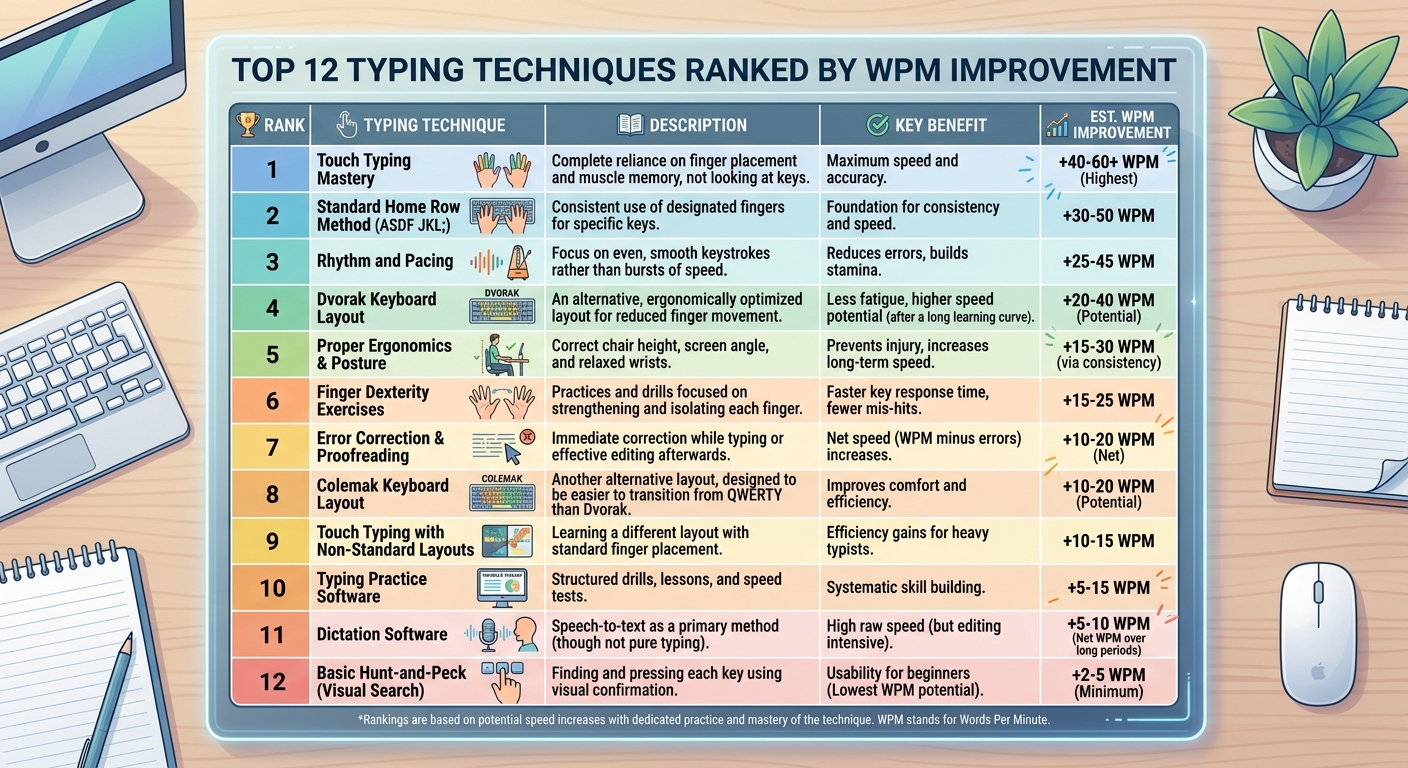
If you’re hoping to go from hunt‑and‑peck to 60 WPM blind typing in 72 hours… that’s not happening. Anyone who says otherwise is selling something.
But here’s what is possible:
In three focused days, you can stop looking at the keyboard, memorize the home row and most letter keys, and type simple sentences at 15–25 words per minute without glancing down.
That might not sound impressive. But for someone who’s been staring at their fingers for years, that’s a life‑changing shift.
I’ve seen it happen. Not with magic. With a brutally honest, hour‑by‑hour plan that respects how your brain builds muscle memory.
So forget the fake promises. Here’s exactly how to learn typing in 3 days – what you’ll actually get, and how to maximize every minute.
What You Can *Actually* Learn in 3 Days (Be Realistic)
Before the plan, let’s set expectations.
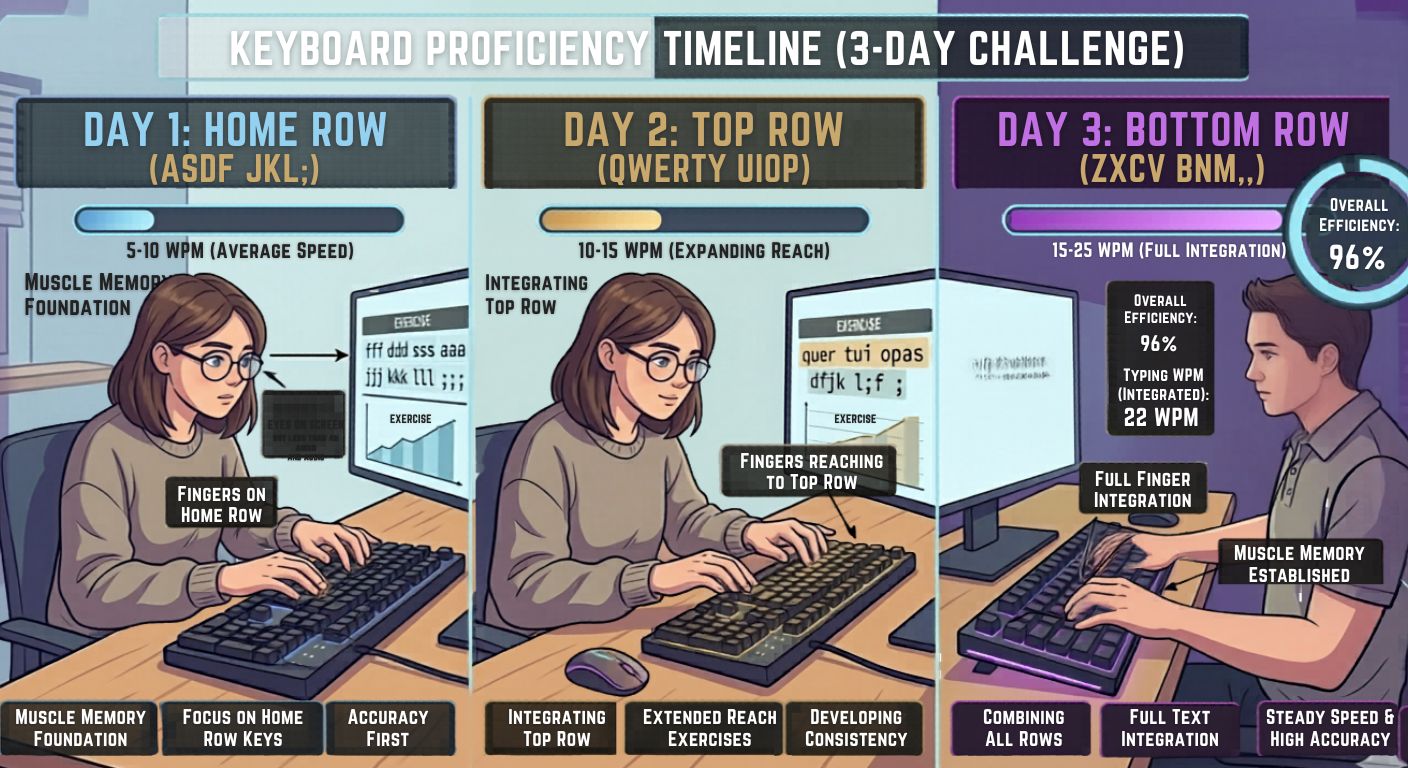
| Skill | Day 1 | Day 2 | Day 3 |
| Home row memorization | Yes | Solid | Automatic |
| Top letter rows | Partial | Mostly | 80% |
| Typing without looking | 5‑10 WPM | 10‑15 WPM | 15‑25 WPM |
| Accuracy | 60‑70% | 70‑80% | 80‑85% |
| Looking down | Constantly | Less often | Rarely |
You will not touch type perfectly in three days. You will not hit 50 WPM. You will not master punctuation or numbers.
But you will break the looking habit – which is the single biggest barrier. And once that habit breaks, speed comes naturally over the next few weeks.
Before You Start: The Non‑Negotiables
If you want to learn typing in 3 days, you cannot mess around.
- Block 6‑8 hours total (2‑3 hours per day). No shortcuts.
- Cover your hands with a towel or use a blank keyboard cover.
- No looking down – even if you make mistakes. Even if it’s painful.
- Use the right software – I’ll tell you which.
- Fix your posture first – or you’ll hurt your wrists.
Ready? Let’s go hour by hour.
Day 1: Home Row Prison (3 Hours)
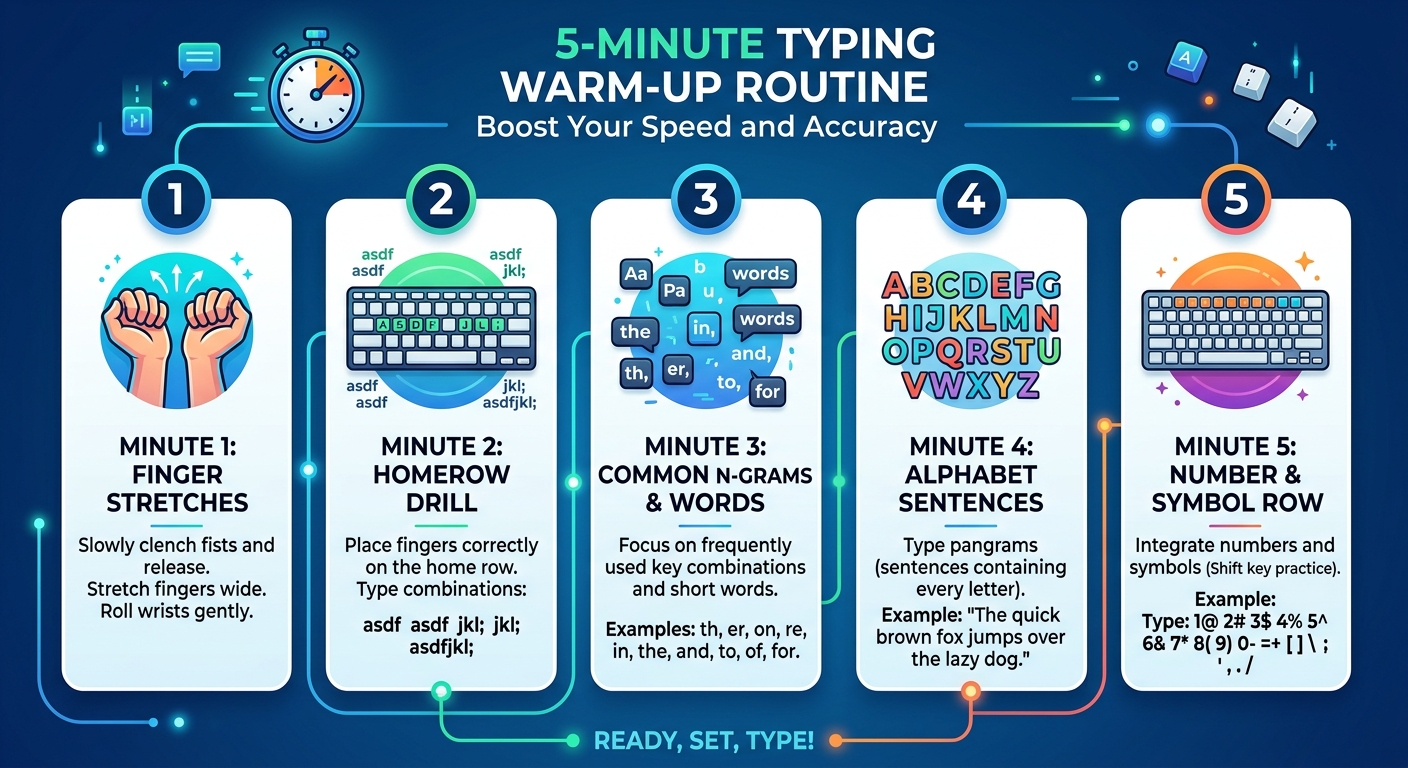
Your only goal today: anchor your fingers on ASDF and JKL; without thinking.
Hour 1: Setup and Home Row Drills
- Place fingers: left pinky on A, ring on S, middle on D, index on F. Right index on J, middle on K, ring on L, pinky on semicolon. Thumbs on spacebar.
- Type “asdf jkl;” slowly, 20 times. Then “fdsa ;lkj” 20 times. Look at the screen only.
- If you peek, reset the count. Seriously.
Hour 2: Expand Within Home Row
Now add the spacebar and basic words. Type “a sad dad” (all home row letters). Type “fall sass” “lads ask”. Keep your fingers glued to home row – only the required finger moves.
Use touch typing exercises on TypingBattles’ single‑player mode to practice real words.
Hour 3: Speed Build (Still Home Row Only)
Set a timer. Type only home row words for 10 minutes straight. Goal: 20 repetitions without a mistake. Then rest 5 minutes. Repeat.
By end of day 1, you should be able to type any combination of A,S,D,F,J,K,L, semicolon, and space without looking. Speed will be ~5‑8 WPM. That’s fine.
Day 2: Add Top Row (3 Hours)
Today you learn Q,W,E,R,T,Y,U,I,O,P. Each finger stays in its vertical column.
Hour 1: Top Row Mapping
- Left pinky: Q. Left ring: W. Left middle: E. Left index: R and T.
- Right index: Y and U. Right middle: I. Right ring: O. Right pinky: P.
- Drill: Type “qwert yuiop” 20 times. Then “poiu ytrewq” 20 times.
Hour 2: Combine Home and Top Row
Type words that use both rows: “quit” “west” “road” “type” “party” “quote”. Keep your fingers returning to home row after each key.
If you get lost, look at the screen – not your hands. The screen’s virtual keyboard shows you which finger to use without needing to peek.
Hour 3: Timed Blends
Do 5‑minute sprints: type random home+top row combinations as fast as you can. Accuracy above 80% only. Then take a typing speed test to measure progress.
By end of day 2, you’ll be at 10‑15 WPM and will catch yourself looking down maybe once every few minutes.
Day 3: Bottom Row, Common Words, and Trust (3 Hours)
Final day. Bottom row: Z,X,C,V,B,N,M. And you’ll learn to trust your fingers completely.
Hour 1: Bottom Row Drills
- Left pinky: Z. Left ring: X. Left middle: C. Left index: V and B.
- Right index: N and M. (Right middle/ring/pinky do no bottom row keys – they stay on home.)
- Drill: Type “zxcv bnm” 20 times. Then “mnb vcxz” 20 times.
Hour 2: Full Alphabet Sentences
Type “the quick brown fox jumps over the lazy dog” repeatedly. This contains every letter. Do it 10 times without looking. Then type a paragraph from any article – but cover your hands completely with a towel.
This is the breakthrough moment. The towel forces blind typing. Your speed will drop. Your accuracy will suffer. Push through. After 20 minutes, your fingers will start to remember.
Hour 3: Real‑World Simulation + Race
Now join a multiplayer typing battle. Choose beginner mode. Race against someone else. The timer and opponent will make you forget to think about fingers – you’ll just type.
After the race, do one final real-time typing race with the towel on. Then remove the towel and type the same text. Notice how you don’t need to look anymore.
By end of day 3, you’ll be at 15‑25 WPM. You’ll make mistakes. But you will type without looking.
The Best “Learn Typing in 3 Days” Software Stack
You can’t do this with paper. You need software that forces repetition and gives instant feedback.
For structured lessons (Day 1‑2 morning
**Typingbattle.com** (free). Do lessons 1‑10 on day 1, 11‑25 on day 2, 26‑40 on day 3. The virtual keyboard shows finger placement.
For muscle memory drilling (all 3 days)
**Typing Battles (Battle Mode)** (free). It generates random words based on your weak keys. Use it for 30 minutes after each Individual session.
For pressure testing (Day 3 afternoon)
**TypingBattles** (free). Multiplayer races. Nothing builds trust faster than a countdown clock and an opponent. Use Battle mode to push past your comfort zone.
For measurement (end of each day)
Take a 1‑minute test. Record your WPM and accuracy. You’ll see daily improvement.
Posture and Finger Position (Get This Wrong and You Waste Your 3 Days)
You cannot learn typing in 3 days if your posture is broken.
- Wrists float – do not rest on the desk or a pad. Ever.
- Elbows at 90 degrees – adjust chair height.
- Forearms parallel to floor – keyboard at the right height.
- Fingers curved – like you’re holding an egg.
- Thumbs on spacebar – not floating in the air.
Check this every 20 minutes. Bad posture becomes habit quickly.
What About Numbers, Punctuation, Capital Letters?
Honestly? Ignore them for the 3‑day crash course.
You can learn Shift keys in a few hours later. Numbers take a separate weekend. Punctuation follows naturally after you’re comfortable with letters.
Focus 100% on lowercase letters and spacebar for these three days. That’s enough to break the looking habit. The rest comes after.
The Most Common 3‑Day Learning Mistakes (Avoid These)
I’ve seen hundreds try the “learn typing in 3 days” challenge. Most fail because of these errors.
Mistake 1: Looking down “just once”
That “just once” becomes 50 times. Cover your hands from hour one. No exceptions.
Mistake 2: Going too fast, making errors
Speed comes from accuracy. If you’re making mistakes, slow down to 2 WPM if you have to. Each error reinforces the wrong muscle memory.
Mistake 3: Using the wrong finger for ‘c’ or ‘m’
‘C’ is left middle finger. ‘M’ is right index finger. Practice “cdc” and “mjm” slowly if you keep cheating.
Mistake 4: Not resting
Your brain builds muscle memory during breaks, not during typing. Take a 5‑minute break every hour. Walk away.
Mistake 5: Stopping on day 3
Three days gives you the foundation. But if you don’t practice for 10‑15 minutes daily for the next two weeks, you’ll lose it. Use typing practice games to maintain momentum.
What You’ll Actually Feel Each Day (Emotional Roadmap)
Day 1: Frustration and doubt
You’ll feel stupid. Your fingers won’t listen. You’ll want to look. That’s normal. Everyone feels this. Push through.
Day 2: Small wins
Around hour 4, you’ll type a word without thinking about individual letters. That feeling is addictive. It keeps you going.
Day 3: Breakthrough
Sometime during the towel drill, your brain will click. You’ll realize you’ve typed three sentences without looking. You’ll smile. Then you’ll make a typo. That’s okay. You’ve crossed the threshold.
s “Learn Typing in 3 Days” a Lie?
It depends what you mean by “learn.”
If “learn” means become a fast, accurate, blind typist – yes, that’s a lie. That takes weeks or months.
But if “learn” means internalize the finger positions, stop looking at the keyboard, and type basic sentences without visual guidance – that is absolutely achievable in three focused days.
And that’s the hardest part. Once you stop looking, speed comes naturally over the following weeks.
So is the headline clickbait? A little. But it’s not false – if you follow this plan, you will learn the foundation of typing in three days. The rest is just practice.
Your 3‑Day Schedule (Printable Cheat Sheet)
Day 1
- 0‑60 min: Home row memorization
- 60‑120 min: Home row words and spacebar
- 120‑180 min: Timed home row drills + typing test
Day 2
- 0‑60 min: Top row mapping
- 60‑120 min: Combine home + top row words
- 120‑180 min: Speed sprints + measure WPM
Day 3
- 0‑60 min: Bottom row drills
- 60‑120 min: Towel drill (full alphabet sentences)
- 120‑180 min: Multiplayer race + final test
What to Do After Day 3
You’ve broken the looking habit. Now don’t waste it.
- Day 4‑10: Practice 15 minutes daily on typing accuracy practice. Focus on correcting your most common typos.
- Week 2: Add Shift keys for capitalization.
- Week 3: Add punctuation (. , ? ! ‘ “)
- Week 4: Add numbers if needed.
Join the typing leaderboard to track your progress against others. Competition keeps you honest.
Within 6‑8 weeks of daily practice, you’ll hit 40‑50 WPM. And you’ll never look at a keyboard again.
Key Takeaways
- In 3 focused days, you can stop looking at the keyboard and type at 15‑25 WPM – but not 60 WPM.
- Use a towel to cover your hands – it’s the fastest way to break the looking habit.
- Follow the hour‑by‑hour plan: day 1 home row, day 2 top row, day 3 bottom row + towel drill.
- TypingBattles (pressure testing).
- Posture is non‑negotiable – float wrists, elbows at 90°, fingers curved.
- Avoid common mistakes: looking down, speeding into errors, wrong finger mapping.
- The emotional journey: day 1 frustration, day 2 small wins, day 3 breakthrough.
- After day 3, practice daily for 15 minutes to solidify the habit and build speed.
Recommendations
Three days. That’s all you’re committing.
No lifetime memberships. No expensive courses. Just 2‑3 hours per day for three days, using free software and a dish towel.
By Sunday night, you’ll be typing without looking at the keyboard for the first time in your life.
Ready to prove yourself wrong?
Start your 3‑day typing challenge now →
Read Also:
- Typing Agent: The Classroom Typing Tutor That Thinks It's A Spy Movie
- Key Master: Slay Monsters, Turn Off the Lights, and Claim Your Typing Crown
- Touch Type Keyboard Layouts: Which One Actually Works Best for Your Fingers?
- Russian Keyboard Layouts: ЙЦУКЕН, ЯВЕРТЫ, and the Struggle of Typing Cyrillic
- Dvorak Layout: The Fast-Typing Alternative to Traditional Keyboards – But Brings Pain Before Progress