Last week, a friend asked me something that stopped me cold.
"I'm thinking of buying a gaming keyboard," he said. "But I don't really game. I just type a lot. Is that stupid?"
I laughed. Then I realized I didn't have a good answer.
So I used my better judgment. I spent way too many hours scrolling through Reddit, reading what actual users say about gaming gear for typing.
The answers surprised me. A lot of what we assume about gaming keyboards and mice is just wrong.
Here's what I found.
The First Surprise: "Gaming Keyboard" Doesn't Mean What You Think
Here's a quote from a Reddit thread that stuck with me. One Redditor said: 'The term 'gaming keyboard" doesn't mean anything. You either have a decent keyboard or a garbage one. There's no such thing as a 'gaming' keyboard vs 'typing' keyboard. Either it's good and does everything well, or it's bad and does nothing well."
That hit me. We've been tricked by marketing into thinking "gaming" is a category. It's not. It's just a label slapped on mechanical keyboards with RGB lights and maybe a few extra macro keys.
The real difference isn't gaming versus regular. It's mechanical versus membrane.
I talked to a friend who's a very good CS: GO player. He still uses a chiclet keyboard – the flat kind you find on a laptop. If he can compete at a high level without a "gaming" board, maybe we're overthinking this.
The Keyboard Features That Actually Matter for Typing
Let me save you some money. Here's what you should look for, and what you should ignore.
What matters:
Mechanical switches – This is the real upgrade. A mechanical keyboard won't automatically make you faster, but it feels better and reduces finger fatigue. You don't have to slam the keys all the way down.
N-key rollover – Fancy term. It just means you can press many keys at once and they all register. Useful if you type fast. Not essential for most people.
Hot-swappable sockets – This is the secret weapon. Being able to swap switches without soldering means you can try different feels until you find the one that clicks for you.
Per-key actuation tuning – A newer feature on magnetic switch boards. You can set movement keys to be super sensitive for gaming, while keeping letter keys a bit deeper for cleaner typing.
What doesn't matter:
RGB lighting – It looks cool for about three days. Then you either turn it off or set it to a static color because the rainbow wave gives you a headache.
8000Hz polling rate – It cannot be processed with a normal brain. Standard 1000Hz is fine.
Macro keys – Extra buttons on the left side. For typing? Completely useless.
The Switch Debate: What Reddit Actually Uses
I read endless threads about linear versus tactile versus clicky. Here's the consensus.
There are smooth switches like Linear switches (like Cherry MX Red). No bump. No click. Gamers love them for rapid double-tapping. For typing? Mixed reviews. Some people say they're faster because nothing slows them down. Others say they make more typos because they can't feel the activation point.
There are small bumps on Tactile switches (like Cherry MX Brown). That bump tells your finger the key has registered. Most people who do both gaming and typing end up here.
Clicky switches (like Cherry MX Blue) are normally loud. People who live alone love them. People with roommates hate them.
One Reddit user put it this way about Hall Effect (magnetic) switches: "Being able to adjust the actuation point on HE boards is rather nice and can help with general typing. That's probably the main advantage if you're just using it for normal stuff."
That's the key insight. The best feature isn't the switch type itself. It's the ability to adjust it.
The Size Question: Full Size vs TKL vs 75%
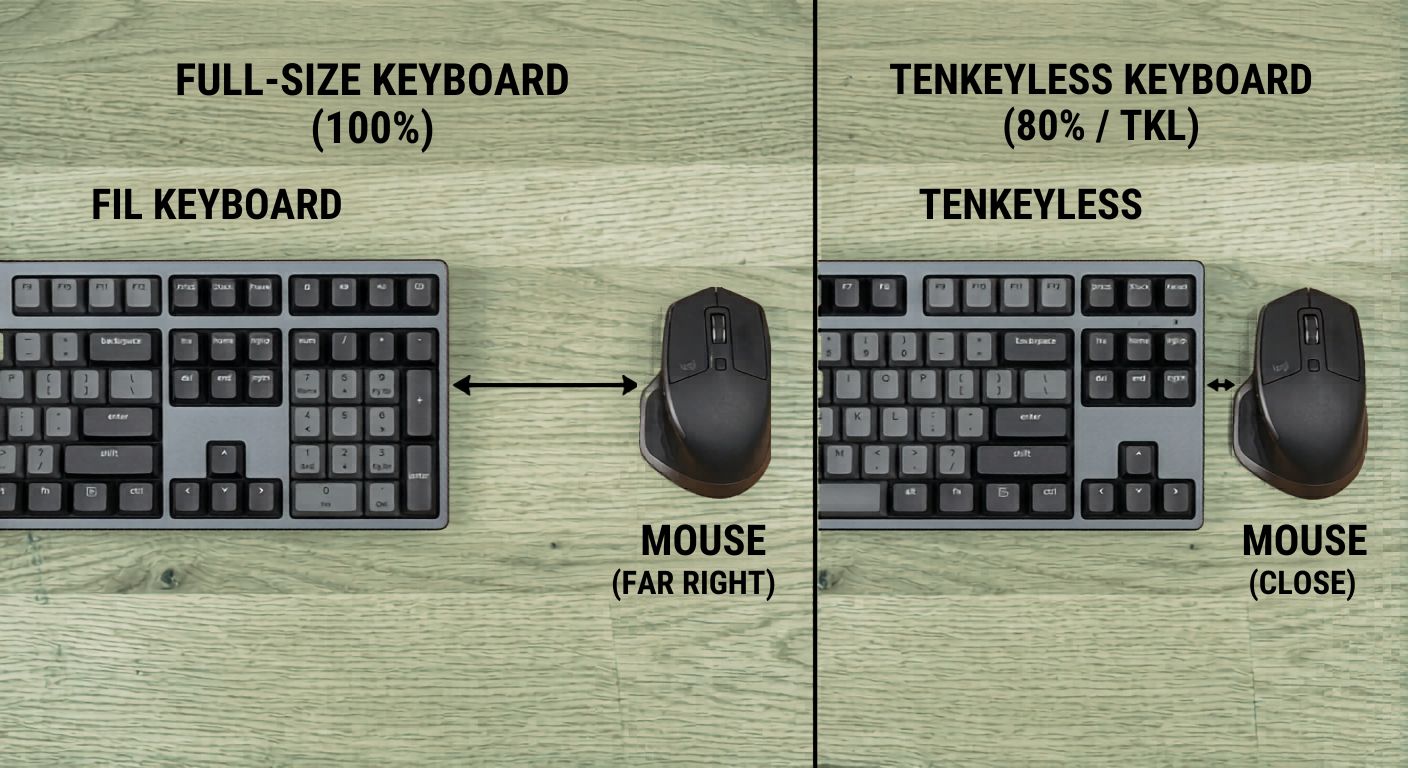
There must be a num pad on the right side of a full-size keyboard. About 17-18 inches.
A tenkeyless (TKL) removes the number pad. Your mouse hand sits about 4 inches closer to your body.
Here's why that matters for typing. When your mouse is closer, your right shoulder doesn't have to reach as far. Less reaching means less strain over long sessions.
One Reddit user recommended TKL specifically: "Go for a TKL (TenKeyLess) size it's compact with F-keys and arrows."
If you absolutely need a number pad for work, buy a separate USB numpad and put it on your left side. Your shoulders will thank you.
The Mouse: Where Gaming Gear Actually Shines for Typists
Here's the part that surprised me most.
A gaming mouse might be more useful for a typist than a gaming keyboard.
Why? The extra buttons.
Common productivity wisdom says keep your hands on the keyboard as much as possible. But if you're constantly switching between typing and mousing, those extra seconds add up.
One user mapped their side buttons to copy, paste, select, delete, and return. Suddenly, editing text became much faster without reaching for Ctrl+C every time.
Another person wrote: "A gaming mouse is like a mountain bike with gears and suspension: more control, more speed, more parts you can tune."
The key features to look for in a mouse for typing:
- Programmable side buttons – At least two. Four is better.
- Adjustable DPI – So you can move the cursor across the screen with tiny wrist movements.
- Comfortable shape – This is personal. Try before you buy if you can.
What you don't need: crazy high DPI numbers, RGB, or "sniper" buttons.
The One Feature Nobody Talks About: Sound Dampening
I stumbled across this while researching. High-end gaming keyboards now include multiple layers of sound dampening – foam, silicone, gasket mounts.
Why does this matter for typing? Because a quieter keyboard is less distracting. And less distraction means better focus.
I came across a review talking about a keyboard that uses five layers of sound-dampening material plus a silicone gasket mount. According to them, it kills those annoying pinging sounds and makes every keystroke feel softer.
If you work in an office or type late at night while someone sleeps nearby, this is a game-changer.
The Best Gaming Keyboard for Typing (According to Real Users)
After reading dozens of threads, a few names kept coming up.
Keychron
Consistently rated high for both gaming and typing. Their Q series has excellent build quality and hot-swappable switches.
ASUS ROG
Specifically the Azoth and Falcata models. Someone said: 'For the way it feels under your fingers, the Extreme is the obvious choice. The thud is glorious."
Wooting
The benchmark for magnetic switches. One user noted: "Being able to adjust the actuation point on HEboards is rather nice and can help with general typing."
Royal Kludge
Budget option that gets the job done. Their M87 model has a screen and dual knobs, which is fun but not essential.
Corsair K95
Older model but still popular. "It has customizable backlighting, a full-sized layout, and nice media controls with a volume wheel."
The Hard Truth: Gaming Gear Won't Make You Faster
Let me be clear.
A gaming keyboard will not increase your WPM. A gaming mouse will not help you win more TypingBattles races.
But here's what they will do: make typing more comfortable. And comfort leads to longer practice sessions. And longer practice sessions lead to faster typing.
That's the chain. Not magic. Just smart ergonomics.
One Reddit user summed it up perfectly: "A mechanical keyboard won't automatically make you a better player or type faster, but I'll be damned, it just simply feels great."
My Setup After All This Research
After reading all those threads, here's what I ended up with.
Keyboard:
A 75% hot-swappable board with Gateron Brown switches (tactile). No RGB. No macro keys. Just solid build quality and a comfortable typing feel.
Mouse:
A basic gaming mouse with two side buttons. I mapped them to Ctrl+C and Ctrl+V. That alone saves me dozens of small movements every day.
Desk setup:
My mouse sits close to my keyboard. My shoulders are square. No straining.
Total cost? About $120. No regrets.
The Bottom Line
Don't buy a gaming keyboard because it has RGB and looks aggressive. Buy a mechanical keyboard because it feels better to type on.
Don't buy a gaming mouse because it has a high DPI. Buy one because the extra buttons save you time.
And most importantly, don't let gear become an excuse. The best typist I know uses a $30 Logitech membrane board. Practice matters more than peripherals.
So set up your gear. Then come race on TypingBattles. That's where the real improvement happens.
Key Takeaways
- "Gaming keyboard" is mostly marketing. The real upgrade is mechanical switches over membrane.
- Tactile switches (Brown) are the sweet spot for people who both type and game.
- TKL or 75% layouts bring your mouse closer, reducing shoulder strain.
- A gaming mouse with programmable side buttons can speed up editing tasks significantly.
- Sound dampening (foam, gasket mounts) makes a keyboard quieter and less distracting.
- Hot-swappable sockets let you try different switches without buying a new board.
- Gaming gear won't increase your WPM, but comfort leads to longer practice.
Author Bio
Abid is a competitive typist and a regular on the TypingBattles leaderboard. He started hunting and pecking at 15 WPM in high school and spent two frustrating years unlearning bad habits. Now he types at 105 WPM and has won over 400 online typing races. When he's not battling strangers on the internet, Abid reads tech forums obsessively and tests every keyboard he can find.
Recommendation
Got gaming gear gathering dust? Or thinking of buying some?
First, take a typing speed test on TypingBattles with whatever you have now. Then, if you upgrade, come back and race again.
See if the gear actually moved the needle.
Read Also:
- Keyboard Clicker: I Added Fake Clicks to My Silent Keyboard – Here's How It Went
- Typing Dinosaur vs Typing Bike, Which Game Improves Typing WPM?
- Typing Nitro Hack vs Eye Gaze Typing: Cheaters Never Win, But Eye Gaze Typing Changes Lives
- Which Is The Best Typing Test: 1 Minute, 3 Minute Or 5 Minute Typing Test?
- Alphabet Typing Test: What It Is And The Need Of It For The Beginners