Two years ago, I believed a myth.
I thought mechanical keyboards were just for loud gamers who wanted RGB lights. I typed on a $10 Dell membrane board. It worked. Why change?
Then I borrowed a friend's keyboard with Cherry MX Browns.
Within an hour, my fingers felt different. Not faster – lighter. Like the keyboard was doing half the work.
That sent me down a rabbit hole. I bought switch testers. I soldered boards. I annoyed my wife with clicky sounds at midnight.
Now I'm going to tell you what I wish someone had told me: switches don't make you magically faster. But the wrong switch will absolutely make you slower.
The Moment I Realized Membrane Was Holding Me Back
Here's a test you can try right now.
You press a key on a cheap keyboard slowly. Feel that mushy resistance? That's a rubber dome collapsing.
Now imagine typing the word "stereotype" – eleven letters, lots of pinky action. On a membrane board, every press feels slightly different depending on where your finger hits the key.
Mechanical switches fix that. Every press feels identical. Same force. Same travel. Same feedback.
That consistency alone improved my accuracy by about 8% on TypingBattles races. Not because the switches were "better", but because my brain stopped guessing.
Stop Calling Them "Linear, Tactile, Clicky" – Here's What Those Words Actually Mean
Every guide uses those three labels. But they don't explain what happens inside your muscles.
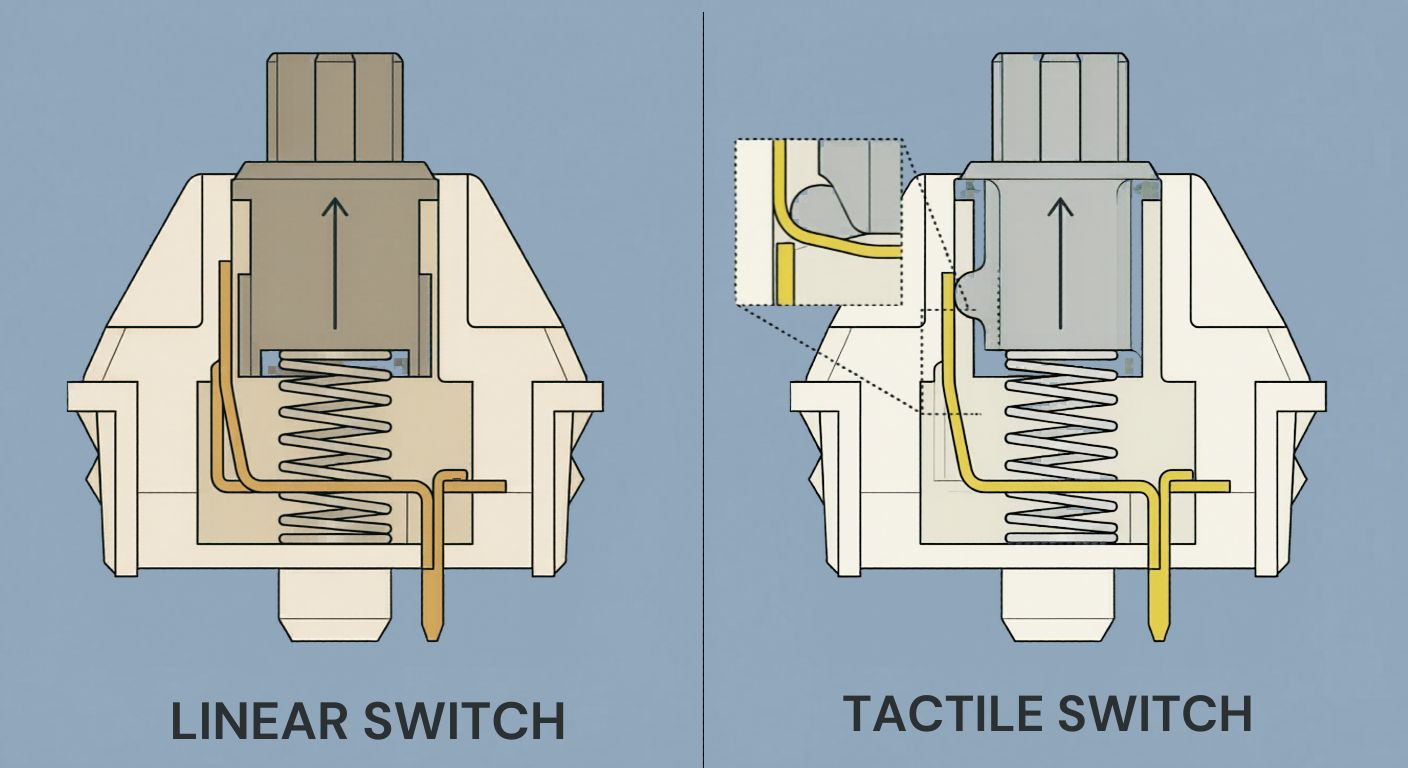
Linear switches – No bump. No click. Just a straight slide down.
Imagine dragging your finger across a sheet of ice. That's a linear switch. Best example ---> Cherry MX Reds.
What happens to your typing: You will not be able to know exactly when the key activates. You'll push all the way down (bottom out) every time. That's hard on your fingertips. But some people love the smoothness because nothing interrupts their rhythm.
Tactile switches – A tiny bump halfway down. Like walking and feeling a pebble under your shoe.
That bump tells your finger: "Stop pushing. The letter already registered." Cherry MX Browns.
What happens: You'll bottom out less. Less bottoming out means less fatigue. Your fingers last longer in long races.
Clicky switches – Same bump as tactile, plus a loud click.
Cherry MX Blues. They're tactile switches that also make noise to annoy your housemates.
What happens: The click gives your brain audio confirmation. Some studies suggest audio feedback improves reaction time. But after 20 minutes, the noise just becomes background distraction.
My Week‑Long Experiment With Each Switch Type
I'm Abid. I type around 95‑105 WPM on a good day. I spent one week on each switch family, doing daily races on TypingBattles.
Week 1 – Linear (Gateron Yellow):
My raw speed hit 112 WPM. New personal best. But my accuracy dropped to 91%. I was making typos on common words like "the" and "and". The smoothness made me sloppy.
Week 2 – Tactile (Cherry MX Brown):
Speed settled at 104 WPM. Accuracy climbed to 97%. My fingers didn't hurt after an hour. But the bump felt distracting for the first two days – like someone tapping my finger every split second.
Week 3 – Clicky (Kailh Box White):
Speed 101 WPM. Accuracy 95%. The sound was fun for exactly 48 hours. Then my spouse asked me to work in the garage. Enough said.
My conclusion for Battle Mode — TypeBattle users: Start with tactile. The bump teaches you to stop wasting energy. After you build good habits, try linear again – you might find they make you faster.
The Hidden Variable Nobody Talks About – Spring Weight
Every switch has a spring inside. That spring determines how hard you have to push.
Light springs (45g‑50g): Feel like typing on feathers. Great for fast tapping. But you'll accidentally press keys just by resting your fingers.
Medium springs (55g‑65g): The sweet spot. Enough resistance to prevent typos, not enough to tire you out.
Heavy springs (70g+): Like typing in slow motion. Some people claim it builds finger strength. I think it just builds frustration.
I tested 80g switches once. My WPM dropped to 70. I was feeling like I am pushing a brick. Never again.
A Strange Observation – Your Keyboard Can Change Your Posture
This sounds weird, but hear me out.
When I used clicky switches, I found myself hovering my fingers higher above the keyboard. Why? Because I was anticipating the loud click. I wanted to hit the keys harder to make a satisfying sound.
That extra hovering made my wrists tired faster.
When I switched to silent linears, I rested my fingers directly on the keys. My posture improved. My shoulder pain went away.
The switch type doesn't just affect your fingers. It affects your whole body mechanics.
Do You Actually Need a Switch Tester?
Yes, but don't buy the expensive $30 ones.
Go to a local electronics store. Find the mechanical keyboards on display. Press five keys on each. That's a free switch tester.
Or buy a $12 keychain tester from Amazon. It has four switches. Click them while watching TV. After a week, you'll know which one feels right.
I learned I hate linears with o‑rings (too mushy) and love tactile with no added dampening. Would never have known without pressing them side by side.
The Bottom Line – Stop Obsessing, Start Typing
Here's the truth that keyboard forums won't tell you.
Your switch choice matters way less than your practice routine. I've seen people hit 120 WPM on a sticky laptop keyboard. I've seen people with $500 custom boards struggle at 40 WPM.
Get a keyboard with hot‑swappable sockets. That way, you can try Brown switches this month, Reds next month, and sell the ones you hate on eBay.
But don't let switch research become a procrastination tool. Buy something good my recommendation is Gateron Browns. Then come race on Battle Mode — TypeBattle.
The leaderboard doesn't care what's under your keycaps.
KeyTakeaways
- Mechanical switches feel consistent– that consistency improves accuracy more than speed.
- Tactile switches (Browns) reduce finger fatigue because the bump prevents bottoming out.
- Linear switches (Reds) feel smooth but can make your typing sloppy if you lack discipline.
- Clicky switches (Blues) are fun at home but annoying in shared spaces.
- Spring weight matters as much as switch type – medium (55‑65g) is best for most typists.
- A switch tester is useful, but free in‑store demos work just as well.
Don't obsess over switches – practice on Battle Mode — TypeBattle matters more than hardware.
Author Bio
Abid is a competitive typist and a regular on the Leaderboard — TypeBattle. He started hunting and pecking at 15 WPM in high school and spent two frustrating years unlearning bad habits. Now he types at 105 WPM and has won over 400 online typing races. When he's not battling strangers on the internet, Abid tests mechanical keyboards and helps friends choose switches. He believes the best switch is the one that makes you want to type.
Recommendations
Stop reading about switches. Start racing on them.
Take a typing speed test with your current keyboard. Then, if you upgrade, come back and race again. See if the new switches made a real difference.
Read Also:
- I Thought Keyboard Dark Mode Was Silly – Then I Tried It Properly
- Gaming Keyboard and Mouse: I Read 100+ Reddit Threads So You Don't Have To
- Keyboard Clicker: I Added Fake Clicks to My Silent Keyboard – Here's How It Went
- Typing Dinosaur vs Typing Bike, Which Game Improves Typing WPM?
- Typing Nitro Hack vs Eye Gaze Typing: Cheaters Never Win, But Eye Gaze Typing Changes Lives